Data Extraction & Integrity Constraints
In this lab, we will use the football datasets.
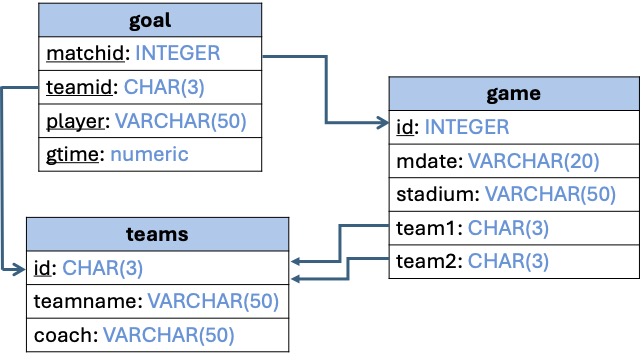
Data Extraction with SQL & Python
DE with SQL (continued)
-
Write an
SQLquery that returns the names of the teams and the total number of goals scored by the players of that team. -
Assuming that every match lasts for 90 minutes, write an
SQLquery that returns the average scoring time for the Spanish team (total number of minutes played divided by the total number of goals scored). -
Write an
SQLquery that returns the number of players who scored goals from the Spanish, Dutch, Polish, and Greek teams. Given the query below, answer the following questions:
What does this query do?
Why we used
HAVING?What do we need to do in order to replace
HAVINGbyWHERE?
SELECT player, count(*) as number_of_goals
FROM goal
GROUP BY player
HAVING number_of_goals  >  2;
DE with PYTHON
In the following exercises, you will practice on working with Pandas DataFrames. You will practice on how to extract parts of the data using Python APIs. You will also practice on connecting to an SQLite database, send SQL queries, and extract the results to a Pandas DataFrame. There are parts where the code is available so you need to run the code, understand and comment on the output. There are also a set of exercises where you need to write the code yourself.
First, we need to import the libraries that are required for our code. You can run the code on Google Colab or using your favorite IDE for Python.
import Pandas as  pd
import   csv
Run the code and comment on the output. After that, solve the exercises with the TODO.
data = {'State': ['Ohio', 'Ohio', 'Ohio', 'Nevada', 'Nevada', 'Nevada'],
          'Year': [2000, 2001, 2002, 2001, 2002, 2003],
          'Population': [1.5, 1.7, 3.6, 2.4, 2.9, 3.2]}
df = pd.DataFrame(data)
df
data = [['Ohio', 2000, 1.5], ['Ohio', 2001, 1.7], ['Ohio', 2002, 3.6],
        ['Nevada', 2001, 2.4],['Nevada', 2002, 2.9], ['Nevada', 2003, 3.2]]
cols = ['State', 'Year', 'Population']
df = pd.DataFrame(data, columns = cols)
df
print("number of columns = ", len(df.columns))
print("number of rows = ", len(df))df = pd.read_csv( filepath_or_buffer = 'sample_data/california_housing_train.csv',
delimiter = ',', doublequote = True,
quotechar = '"',na_values = ['na', '-', '.', ''],
quoting = csv.QUOTE_ALL, encoding = "ISO-8859-1")
dfYou may also use your own dataset or the movies dataset that can be downloaded from this LINK.
Use the california_housing_train dataset in the following exercises:
df.info()    # index & data types
n = 4
dfh = df.head(n)            # get first n rows
dft = df.tail(n)             # get last n rows
top_left_corner_df = df.iloc[:5, :5]
TODO: display the content ofdfh, dft, top_left_corner_df
col_set = df.iloc[:, 5:9]
col_set
This code extracts columns 6, 7, 8, 9 assuming the first column is numbered 1 not as the python index 0.
For columns that are not in the same range, we separate the columns indexes with a comma.
TODO: write the code to extract ROWS 11, 13, and 15 from the DataFrame.
df.loc[(df['total_rooms'] > 5000).values,
        ['longitude', 'latitude', 'total_rooms',  'median_house_value']]
Another way:
df.loc[(df['total_rooms'] > 5000).values, [0, 1, 3, 8]]
We will also use the california_housing_train dataset in the following exercises:
TODO: print the names of the columns (attributes) of the dataframe.
First, we need to import the required library. The sqlite3 library is installed by default on Google Colab.
The following function receives the name of the database file as input and returns a connector to the database.
def create_connection( db_file):
    """ create a database connection to the SQLite database specified by the db_file
    :param db_file: database file
    :return: Connection object or None
    """
    conn = None
    try:
        conn = sqlite3.connect(db_file)
    except Error as e:
        print(e)
return connSending a query to the database and receiving the resulting relation can be done through the following function, which receives a connector and a query and returns the results after running the query.
 def run_query(conn, query):
    """
    Query all rows in the teams table
    :param conn: the Connection object
    :return: the results of executing the query
    """
     # Create a cursor
    cur = conn.cursor()
    # Send the query to the database
    cur.execute(query)
    # Extract the results of the query
    results = cur.fetchall()
    # Return the results
    return results
The following function receives a connector and table name, then it sends two queries to get the names of the columns and the data. After receiving the query output, it creates a Pandas dataframe and returns it.
 def convert_db_table_to_DF(conn, table):):
    # get the names of the attributes in the database table
    header_query = "SELECT name FROM pragma_table_info('" + table + "') ORDER BY cid;"
    cols_init = run_query(conn, header_query)
    cols = [cols_init[i][0] for i in range(len(cols_init))]
    # get the records of the table
    content_query = "Select * FROM " + table
    data = run_query(conn, content_query)
    df = pd.DataFrame(data, columns = cols)
return df Querying the database to get the names of the tables in the database.
database = "sample_data/football.db"
# create a database connection
conn = create_connection(database)
with conn:
    query = 'SELECT name FROM sqlite_schema WHERE type =  "table"'
    data = run_query(conn, query)
print(data) Write your own query
'''
TODO: Write the code to read the data in the game table, store it in
a DataFrame and display the contents of the DataFrame.
'''
This is equivalent to the union and join operator in RA and SQL.
TODO: read the contents of the files california_housing_train.csv and california_housing_test.csv and store them in df_train and df_test. Find the union the two dataframes and store the results in a DataFrame `df_cal_housing.
TODO: connect to the football database and read the data in the goals and game relations. Store their contents in two DataFrames df_goal and df_game and join them into df_goal_game dataframe.
Integrity Constraints & Database Design
Integrity constraints are arbitrary predicates that ensure the consistency and the validity of the values in a database. They act as guards against any accidental damage that could happen to the database. In the following exercises, you will practice using a set of integrity constraints that have been studied during the lecture.
Identify and define the PRIMARY KEYS for each of the relations (goal, game, teams).
Identify and define the FOREIGN KEYS in each of the relations in the previous question. Define how you would like to enforce the Referential Integrity.
Add an attribute Confederation in the table teams, where the values are restricted to be from the list (UEFA, CONMEBOL, CAF, AFC, CONCACAF, OFC and CONIFA).
Write an SQL query to remove the record of the teams with id = "ESP". Will the query work by default or not. If it didn't work, what do you need to do?
Try the following query: INSERT INTO teams values("FRA", "France", "Zidane"). Will the query work or not and why?
PRAGMA table_info(tab_name)PRAGMA table_info(tab_name)PRAGMA foreign_keys;PRAGMA foreign_keys = 1;