Data Extraction
Overview
In this lab, you will work on creating tables (relations) and adding/deleting records to/from the tables. You will learn also how to modify a database by altering the tables (adding/deleting attributes) or even deleting the whole table. When writing the SQL queries, it is good to keep a copy of the queries in a plain text document so you can use them later (if needed).
Moreover, you will work on querying databases using relational algebra and SQL. The exercises in this lab are similar to the examples that you studied during the lecture. The purpose of the lab sessions is to get the hands-on experience that is required for future career.
Note: we will use table and relation exchangeable unless something else is specified.
The exercises in this lab are based on the following schema and the data is available as .csv files, which can be downloaded using this LINK. The database schema is:
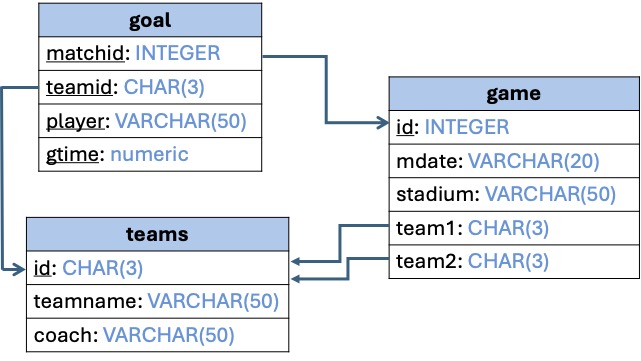
Table Manipulation
Write the SQL query that creates the three tables in the Figure. For now, you don’t need to specify the primary/foreign keys or any additional constraints. Just the data type of each attribute. Insert some records to the tables or import the data in the csv files into the tables.
Creating the game relation
CREATE TABLE game (
   "id" INTEGER,
   "mdate" VARCHAR(20),
   "stadium" VARCHAR(50),
   "team1" CHAR(3),
   "team2" CHAR(3)
);
Creating the goal relation
CREATE TABLE goal (
   "matchid" INTEGER,
   "teamid" CHAR(3),
   "player" VARCHAR(50),
   "gtime" numeric
);
Creating the teams relation
CREATE TABLE teams (
   "id" INTEGER,
   "teamname" VARCHAR(50),
   "Coach" VARCHAR(50)
);
Inserting records in the table teams
INSERT INTO "teams" VALUES   ('POL','Poland','Franciszek Smuda');
INSERT INTO "teams" VALUES   ('GRE','Greece','Fernando Santos');
INSERT INTO "teams" VALUES   ('NED','Netherlands','Bert van Marwijk');
You can also read a whole csv to a table from the sqlite3 command line as:
sqlite3> .mode csv
sqlite3> .import --csv teams.csv teams
On DB Browser, you can select import -> Table from CSV file ... from the file drop down menu to insert the data in the csv file into the corresponding table.
-
You might have noticed that when importing the
csv, some of the values in the tables table are missing or incorrect. Update those records by adding the values from thecsvfile. -
Write an SQL query to add an attribute
assist_providerin thegoaltable. If you have inserted a few records in the
goaltable before, display the records of the table and check the values in theassist_providerattribute.Before performing the next tasks, make sure that you have the query for creating the tables that you will work on and you have the queries for inserting the records again.
Delete all the records from the table. Make sure that the table itself is not deleted.
Delete the table and its content. Comment on the differences between the two queries.
Here is an example, you can do the rest in the same way.
UPDATE "teams"
 SET   coach = 'Joachim Löw'
WHERE id = 'GER'; ALTER TABLE goal ADD COLUMN assist_provider; 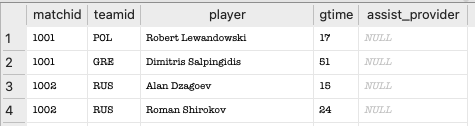
Deleting all the records in the goal table:
DELETE FROM goal; Deleting the data and the schema:
DROP TABLE goal; Relational Algebra
Write the following queries in relational algebra:
Find the names of the stadiums where the Netherlands national team played a game.
Find the names of the players who scored a goal in all the games when Poland was playing.
$\ \ \ \ \pi_{player}\left(goal \bowtie_{goal.matchid\ \ =\ game.id}\left(\sigma_{team1 = `POL'\ \ \vee \ \ team2 = `POL'}(game)\right)\right)$
Find the name of the top scorer.
$\ \ \ \ \pi_{stadium}\left(\sigma_{team1 = `NED'\ \ \vee \ \ team2 = `NED'}(game)\right)$
$\ \ \ \ \ goal\_count \leftarrow_{player}\gamma_{count(matchid)\rightarrow P\_goals}(goal)$
$\ \ \ \ \ max\_goals \leftarrow \gamma_{\max(goals)\rightarrow max\_goals}(goal\_count)$
$\ \ \ \ \pi_{player}\left(goal_count\bowtie_{goal\_count.P\_goals = max\_goals} max\_goals\right)$
Data Extraction with SQL
For SQL, we will have two types of exercises. Type1, you need to interpret and understand the outcomes of an SQL Query. Type2, You will need to write your SQL query to extract specific piece of data.
To run these queries, you need to have the data inserted to the three tables from the csv files.
You can also write more SQL queries on the university database univdb-sqlite.db, which can be downloaded from here. Try to run the queries that we discussed during the lecture.
Q1. SELECT-FROM-WHERE
SELECT teamname, coach FROM teams
WHERE id = 'FRA';
This query will return a relation with two attributes teamname and coach . The relation will have one record that represents the full name and the coach's name of the team with code FRA.
Note: We know that the output of any query is a relation so we will omit that detail in the rest of teh queries.
Q2. Using DISTINCT
SELECT DISTINCT player FROM goal;This query will return the names of all players who scored at least one goal. Each player will be mentioned once.
Q3. Using ALL
SELECT ALL player FROM goal;This query will return the names of all players who scored at least one goal. Players will be repated as the number of goals they scored.
Q4. Using named literal attribute
SELECT 'ABC' AS 'V1';Will return a relation with a single attribute `V1’ and this attribute has a single value `ABC’.
Q5. Using named literal attribute with FROM
SELECT `ABC' FROM teams;
Will return a relation with a single attribute `ABC’ and this attribute has 17 cells (similar to the number of records in the teams relation). Each cell contains the value `ABC’.
Q6. Join
SELECT player, stadium FROM goal, teams
WHERE matchid = id;
Will return the name of the player and the stadium where that player scored a goal.
Q7. Self-join
SELECT g1.matchid, g1.player, g1.teamid, g2.player, g2.teamid FROM goal AS g1, goal AS g2
WHERE g1.matchid = g2.matchid AND g1.player <> g2.player;
Will return the combinations of any two players with their teams names who scored in the same match. Every combination will be listed twice.
Q7. Left-outer join
SELECT * FROM goal
LEFT OUTER JOIN game
WHERE goal.matchid = game.id;
This query will return a relation with the information of the goals and the matches when they were scored.
Note: For LEFT OUTER JOIN, all the records in table to the left of the join operator should appear in the resulting relation even if the record has no corresponding record in the table to the right of the join operator. In that case, the information from the table to the right will be replaced by null.
In this part, you will write your own SQL queries to perform the following tasks.
Write a query that returns the information of the teams who played at least one game.
Older versions of SQLite support
LEFT OUTER JOINonly. How do we rewrite the following query to be able to run on those versions?Older versions of SQLite support
LEFT OUTER JOINonly. How do we rewrite the following query to be able to run on those versions?Write a query that finds the names of all players that contain the substring “an” in their names.
Write a query that finds the names of all players, who scored goals, that contain the substring “an” in their names. Show the name of the player only once.
Write a query that returns the names of the players from the Netherlands, Spain and Poland who scored at least a goal. Show the name of the player only once.
Given the query below, answer the following questions:
What does this query do?
Why we used
HAVING?What do we need to do in order to replace
HAVINGbyWHERE?
SELECT t.id, t.teamname, t.coach  FROM teams AS t
JOIN game as g
WHERE t.id = g.team1 OR t.id = g.team2;SELECT * FROM goal
RIGHT OUTER JOIN game
WHERE goal.matchid = game.id;
We can do that by changing RIGHT OUTER JOIN to LEFT OUTER JOIN and switch the position of the tables around the join operator as follows:
SELECT *  FROM  game
LEFT OUTER JOIN goal
WHERE goal.matchid = game.id;SELECT * FROM goal
FULL OUTER JOIN game
WHERE goal.matchid = game.id;SELECT gl.matchid, gl.teamid, gl.player, gl.gtime, gm.mdate, gm.stadium, gm.team1, gm.team2
FROM goal AS gl
LEFT OUTER JOIN game AS gm
WHERE gl.matchid = gm.id
UNION
SELECT gl.matchid, gl.teamid, gl.player, gl.gtime, gm.mdate, gm.stadium, gm.team1, gm.team2
FROM game AS gm
LEFT OUTER JOIN goal AS gl
WHERE gl.matchid = gm.id
SELECT  player
 FROM  goal
WHERE player LIKE '%an%'
SELECT DISTINCT player  FROM  goal
WHERE player LIKE '%an%'
SELECT player  FROM  goal
WHERE player LIKE '%an%'
GROUP BY player
SELECT DISTINCT player  FROM  goal
WHERE teamid in ('NED', 'ESP', 'POL')
SELECT player, count(*) AS number_of_goals
FROM goal
GROUP BY player
HAVING number_of_goals  >  2;